コンテナをGUIでブラウザから管理できるツール「Portainer」の導入方法
Podmanコンテナを管理する際はCockpit-podmanから、もしくはサーバにSSH接続してCUIで対応しているが「Portainer」というツールを使うとGUIかつCockpit-podmanより詳細な管理ができるらしいので試してみたい。以下に導入方法をメモ。
Portainer
公式サイト
環境について
VPS
今回はKAGOYA CLOUD VPSのCPU1コア / メモリ1GBプランで作業した。SSH接続は公式案内の通り以下でログインできる。
- 接続ポート -> 22
- ユーザ名 -> root
- パスワード or 秘密鍵 -> インスタンス作成時に選択したもの
ホスト(VPS)側
- AlmaLinux 8.10 (Cerulean Leopard)
コンテナ側
- podman version 4.9.4-rhel
対応方法
(必要に応じて)PodmanとDockerの互換ツールの導入
既にインストールされている場合は不要。
# podmanとdockerの互換ツールをインストール(ソケット通信に必要)
dnf install podman-docker
docker-compose.yml
services:
    portainer:
        image: portainer/portainer-ce:latest
        container_name: portainer
        restart: always
        ports:
            - "9000:9000"
        volumes:
            - /var/run/docker.sock:/var/run/docker.sock:ro
            - ./portainer_data:/data
        deploy:
            resources:
                limits:
                    memory: 128M
コンテナの作成・起動
# docker-compose.ymlを設置したディレクトリに移動
cd /path/to

# コンテナ起動
podman compose up -d
正常にコンテナ起動ができた場合、ブラウザから「ipアドレス:9000」にアクセスすると以下のユーザー作成ページが開くはず。
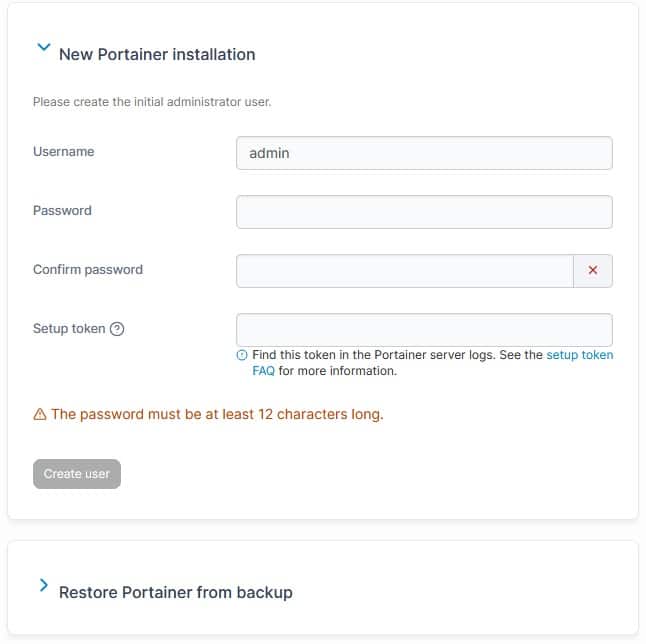
Username / Passwordは何でもいいがSetup tokenは以下コマンドを実行して取得する。
podman logs portainer | grep "setup_token="
するとずらっとログが表示されるが、その中に以下が見つかる筈。
xxxx/xx/xx xx:xx INF github.com/portainer/portainer/api/cmd/portainer/main.go:262 > no administrator account configured; admin initialization and backup restore require this setup token in the X-Setup-Token header. Start with --no-setup-token to disable. | setup_token=xxxxxx
「setup_token=xxxxxx」を使用することでユーザー作成できる筈。尚、Setup tokenは有効期限がコンテナ起動から5分間みたいなので注意する。
正常にユーザー作成できた場合、当該ユーザーでログインし各種コンテナ管理を行える筈。
補足
スナップショット設定
Portainerはコンテナやイメージの一覧情報等、メタデータをスナップショットとして残すらしく、デフォルトだと5分間隔で動作する。
メモリ割り当てが少ない場合等で動作が重い場合は「Setting -> General」に進み、Application内のsettingsSnapshot intervalの値を「30m」等に変更すること。
尚、メタデータのスナップショットのため、コンテナそのもののバックアップを取る訳ではない。
参考サイト
https://www.reddit.com/r/portainer/comments/1cle5n7/cannot_run_portainer_after_installed/
関連記事
-
-
Podmanのapache-php8.4同梱版コンテナのPHPをアップデートする方法
PHPの現行バージョンにて致命な脆弱性が見つかったとのニュースを聞いた。かなり重 ...
-

-
コンテナ側のApacheのアクセスログにリバースプロキシのIPではなく本来のアクセスIPを出力する方法
ホスト側Nginxからリバースプロキシ経由でApacheコンテナに接続する環境に ...
-
-
docker-compose.ymlでまとめてコンテナ作成・起動・ネットワーク接続する方法
Podmanでコンテナを作成してネットワーク接続する際、Cockpit上やCUI ...
-

-
PodmanでPython用コンテナを作成しデータベース用コンテナに接続する方法
PodmanでPython用コンテナを作成しデータベース(MariaDB)用コン ...
-

-
AlmaLinux9系にホスト側NginxとPodmanコンテナ環境を構築する方法
AlmaLinux8系から9系に移行し、さらにLAMP環境からPodmanコンテ ...